Similar shots, same keywords: why your photos compete
You shoot a burst — ten near-identical frames of the same scene, a few seconds apart. You keyword the first one, copy those keywords onto the other nine, and upload all ten. It feels like ten times the inventory. It is closer to one listing competing against itself nine times. Here is why near-identical shots need different keywords, and how to give them different keywords without inventing anything.
Why identical keywords hurt a burst
Two things go wrong when you paste one keyword set across a set of similar frames — one at review, one in search.
- Agencies reject near-duplicates. Getty explicitly warns against submitting multiple files that are too similar to others in the same series — they can be flagged as duplicate content and rejected. A wall of almost-identical frames is a rejection risk, not extra inventory.
- The survivors compete with each other. Stock search shows a buyer the best match for their query. If five of your frames carry the exact same keywords in the exact same order, they are all chasing the exact same search — so they split the traffic and rank against each other instead of covering five different searches between them. This is keyword cannibalisation, and it is invisible until you notice a whole set barely sells.
The core idea
The fix: vary the emphasis, never the truth
The goal is not to make the frames sound different than they are. It is to lead each one with a different true facet of the same scene, so they spread across searches instead of stacking on one. Same shoot, honest variation:
- Give each frame a different leading keyword and a slightly different title angle.
- Shift emphasis to what that specific frame shows best — weather, action, setting, mood.
- Never invent a keyword that isn't defensible from that exact frame.
A worked example: three frames, one jog
Below are three real frames from a single set — two friends jogging in Central Park — tagged with varied context turned on. The titles share an honest common core (Two male friends jogging) and then diverge. Watch the leading keywords: each frame leads with a different true detail, so the three cover running, New York City / rain, and sport / fitness instead of all three fighting over "men jogging outdoors."

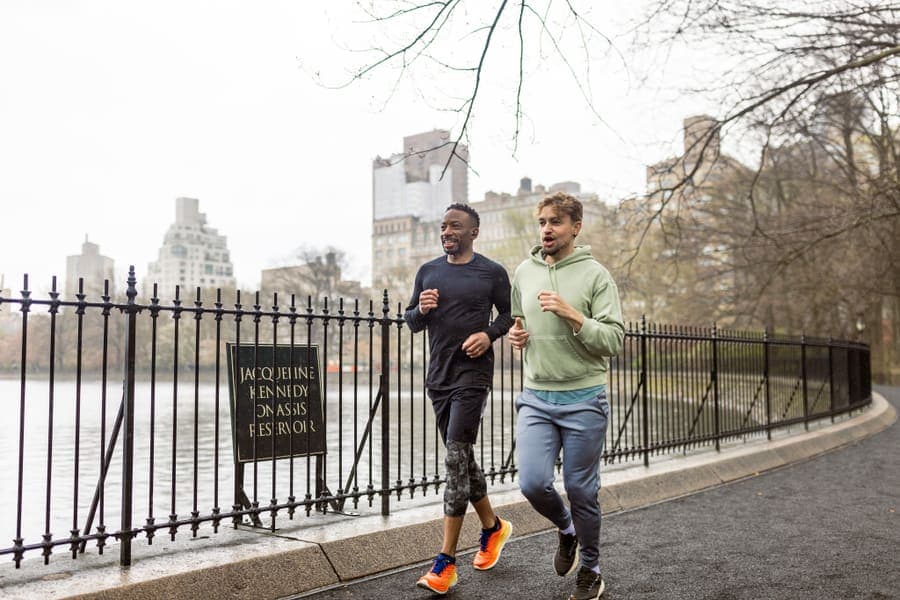
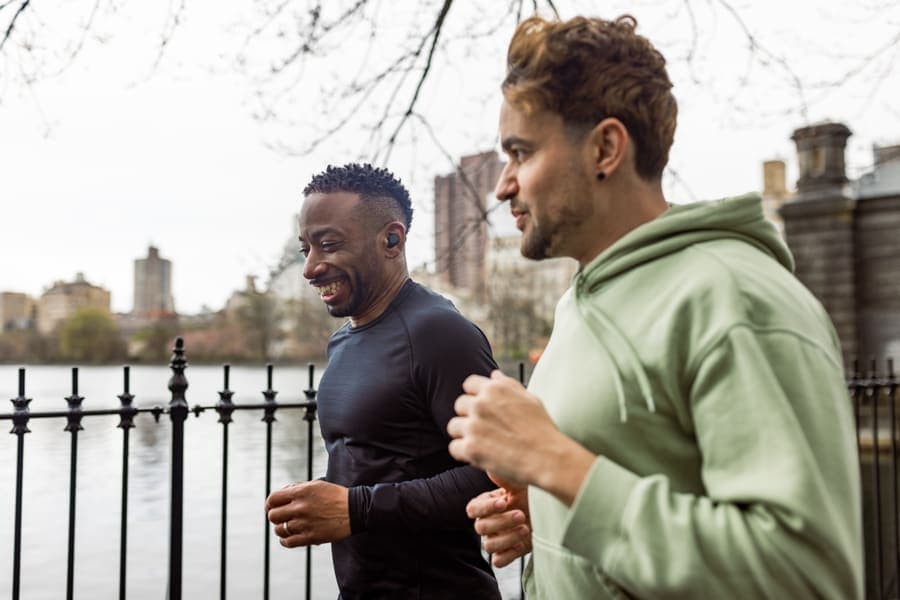
Nothing here is fabricated. Every distinct keyword — Rain, New York City, Fitness Boot Camp— is honestly present in the frame it's on. All three still share the true common core (Men, Jogging, Outdoors, Physical Activity). The difference is which true facet leads. That single change is what turns three competing files into three files that each own a different search.
The rules that keep it honest
- A detail shot is described on its own terms.If one frame in the set is actually a close-up of shoes, or an empty path, or shows no people, it is not forced to match the others — it's keyworded for what it really is.
- Keywords vary in order and emphasis, not in accuracy.The set never gains a keyword that isn't true of the specific frame.
- Facts are left alone. On video, camera-movement terms (pan, tilt, static shot) describe what the camera actually did — those are never shuffled for variety's sake.
- Only use it on a real set. Varying context makes sense when the frames genuinely come from one shoot. On a mixed batch of unrelated images, there is nothing to de-duplicate — leave it off.
PixTagger can spread the keywords across a whole burst for you — automatically, and without inventing a thing.
Try it freeHow we built this into PixTagger
We turned this discipline into a feature so you don't have to hand-balance a set frame by frame. It's an opt-in checkbox — "These are similar shots from the same set" — because it only makes sense on a real burst, and here is what it actually does under the hood, in plain terms:
- Each frame is told what its siblings already took.When the set is tagged, every frame's analysis is given the leading angles the other frames in the same set have already claimed, so it deliberately leads with a different true facet instead of the same one.
- No extra API call, no extra guessing.The variation happens within the same vision pass we already run — it changes which true terms lead, not whether the analysis is accurate. It doesn't invent keywords to look different.
- A duplicate check at the end of the batch.After the whole set is tagged, we compare the frames and nudge any that still came out too alike, so you don't ship five files with the same leading keywords.
- Every guard still runs. A varied file goes through the same 90+ quality and safety checks as a normal one — controlled-vocabulary matching, the people-vs-no-people guard, camera-movement facts left untouched. Varying context never switches off accuracy.
The result: you drop a shoot, tick one box, and each frame comes back leading with a different honest angle — five frames of the same meeting can rank for five searches instead of splitting one. It costs a little more per file and takes slightly longer, which is why it's off by default and on when you need it.
In short
Frequently asked questions
- Should similar stock photos have the same keywords?
- No. Identical keywords on near-identical frames make them compete for the same search instead of covering different ones, and agencies like Getty can reject files that are too similar as duplicate content. Give each frame a different true leading keyword so the set spreads across searches.
- What is keyword cannibalisation in stock photography?
- It's when several of your own files carry the same keywords in the same order, so search treats them as answers to the same query. They split the traffic and rank against each other instead of each owning a different search — so the whole set underperforms.
- How do I keyword a burst of similar shots without inventing terms?
- Keep the genuinely distinct frames, share the honest common core (what's true of all of them), then lead each frame with a different true facet — weather, action, setting, mood — that the specific frame actually shows. Vary the emphasis and order, never the accuracy. PixTagger's varied-context mode does this automatically.
Written by a working stock contributor
NoSystem Images
Getty Images / iStock exclusive contributor since 2007
PixTagger is built by NoSystem Images, an exclusive Getty Images and iStock contributor since 2007, with a live portfolio of over 57,000 photos and 9,700 videos. Every keywording rule in the app comes from nearly two decades of actually selling on Getty, iStock and Adobe Stock — not from guesswork.
Related guides & tools
- Why stock photos and video get rejected — the published similar-content thresholds at each agency
- The complete Getty & iStock contributor guide — why Getty rejects near-duplicates, and the full workflow
- Getty controlled vocabulary explained — specific terms first, matched to the approved list
- Getty Images keyword tool — tag a whole set with varied context in one pass
Stop hand-keywording every upload
PixTagger writes buyer-focused titles, descriptions and marketplace-ready keywords for your photos and videos in seconds — with a Getty controlled-vocabulary CSV, an Adobe CSV, and qHero export built in.