Adobe Stock keyword order: why the first keywords decide
Most Adobe Stock contributors treat keywords as a checklist: add as many relevant words as you can and move on. But Adobe's search does not read your keywords as a flat bag of words — it weights them by position. The first keywords on a file carry the most ranking power, and the order you choose quietly decides whether buyers ever see your work. Here is how that weighting works and how to order keywords so your files get found.
Does keyword order really matter on Adobe Stock?
Yes — and not subtly. Adobe Stock's own contributor guidance calls keyword order "the most critical thing you can do" to help buyers find your content, and states plainly that the first 10 keywords carry the most weight in search placement. So two files with the same keywords can rank very differently: one leads with its strongest terms, the other buries them at position 30 and competes for nothing.
This is the opposite of how most people keyword. The natural habit is to brain-dump words as they come to mind, or worse, to let software sort them alphabetically. Both throw away your most valuable real estate: the front of the list.
Why the first keywords carry the most weight
Think about how a buyer searches. They type a short, specific query — "woman working from home laptop" — and they expect the top results to match it closely. To deliver that, a marketplace has to decide which of your keywords describe the core of the image and which are secondary detail. Position is the simplest, strongest signal it has: keywords you place first are treated as the ones that matter most.
So the leading keywords do two jobs at once. They tell Adobe what your image is fundamentally about, and they decide which high-intent buyer searches you compete in. That is why Adobe weights your first 10 keywords most heavily — they are its best read on the core of your image. Get them right and a single file can surface across a whole family of relevant searches. Get them wrong — generic words first, the real subject buried — and you compete for nothing.
The order that actually works
After tagging tens of thousands of stock files, a reliable priority order emerges. Lead with the concrete, high-value facts a buyer searches for, then move outward to broader concepts:
- Number of people— "one person", "two people", "group". A huge share of commercial searches start here.
- Who they are— apparent gender and broad age band ("young woman", "senior man").
- The main action— what is actually happening ("working", "writing", "running").
- Time and place— the setting and, when clear, time of day or season ("home office", "indoors", "sunset").
- Key objects— the important things in frame ("laptop", "notebook", "coffee").
- The strongest concepts— the idea or mood buyers search for ("productivity", "focus", "work-life balance").
- Broad single words last— generic catch-alls ("business", "lifestyle") belong at the back, not the front.
Bring your title's words into your top 10 keywords
Adobe gives one more specific instruction worth following to the letter: take the individual words and concepts from your title and make sure they also appear in your top 10 keywords— Adobe says this earns "an extra bump in search relevance." A file whose title and leading keywords agree on the subject sends a clean, consistent signal about what the image is, and that consistency is what gets rewarded.
A worked example
Take this photo: a young woman sitting at a desk, writing in a notebook with a laptop and warm lighting behind her. A weak keyword list might open with beautiful, brown, cozy, beige, indoors — colors and adjectives that almost nobody searches first. A strong list leads with the facts a buyer actually types:
Strong order: one young woman → student → writing → working at home → laptop → home office → education → concentration → learning → then concepts, colors and qualifiers afterwards.
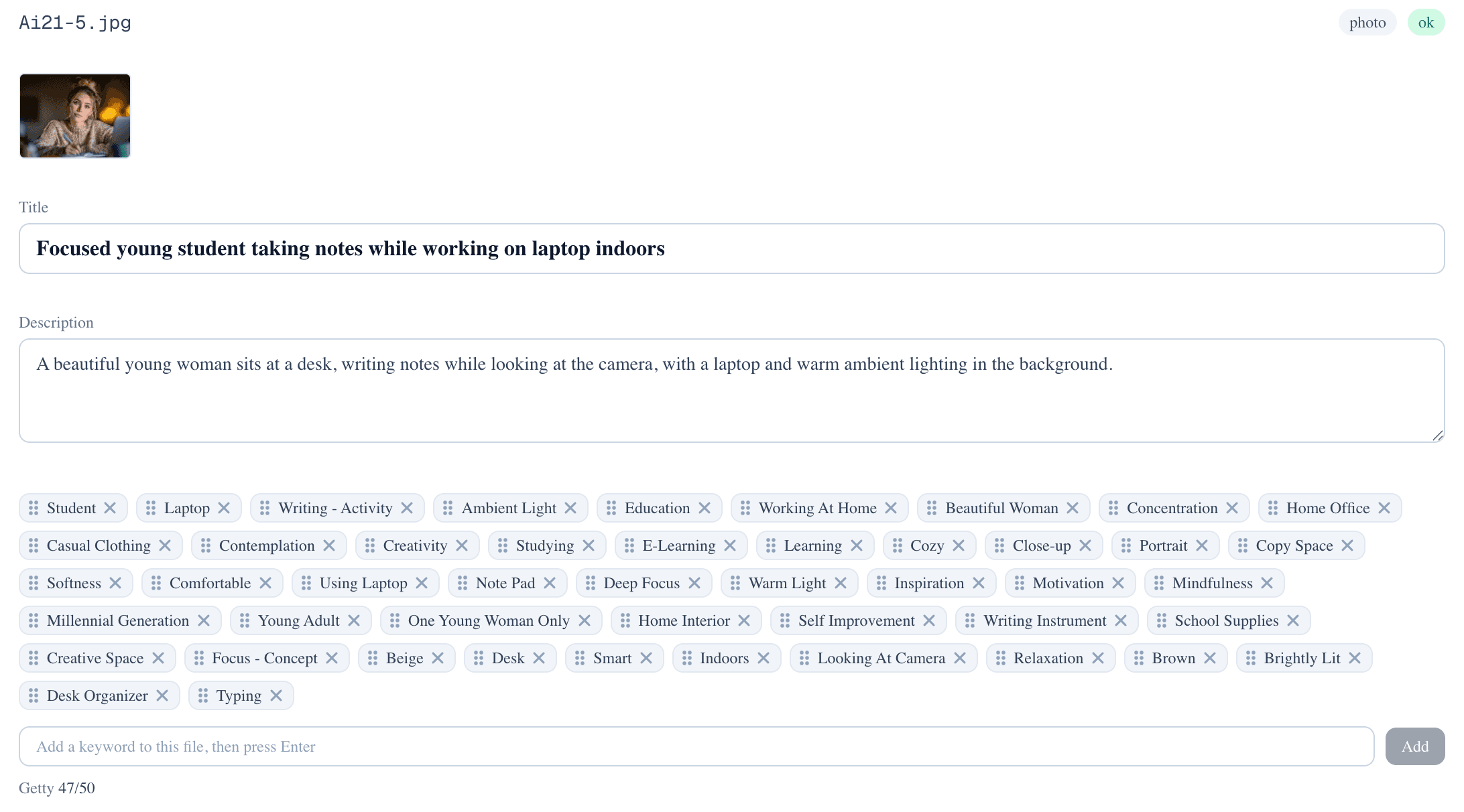
Same image, same vocabulary — but the second order competes for "woman working from home", "student studying laptop", and "home office education" from the very first keywords, while the first order wastes its strongest slots on color words.
Phrases vs single words: order them differently
Adobe Stock and Getty reward slightly different keyword shapes, and your ordering should respect both. Adobe's search leans on multi-word buyer-intent phrases ("woman working from home"), so those deserve front placement. Getty and iStock lean on concise single-word terms from a controlled vocabulary, so strong single words matter there. The fix is not to choose one — it is to include both shapes in the same list and order them by search value, leading with the high-intent phrases and finishing with broad single words.
If you also submit to Getty or iStock, it is worth understanding why their single-word terms are non-negotiable — we cover that in our guide to Getty's controlled vocabulary.
Five ordering mistakes to avoid
- Alphabetical order. It feels tidy and ranks terribly — it scatters your strongest keywords at random.
- Colors and adjectives first."Blue", "beautiful", "bright" are real keywords, but they belong near the end, not leading the file.
- Synonym stuffing up front. Five words for the same thing in the first ten slots crowds out other searches you could win.
- Generic words first."Business", "lifestyle", "background" are so broad they convert poorly as leading terms.
- Over the limit. Adobe Stock caps keywords at 49. Go over and your CSV is rejected — so spend those 49 slots on the most valuable terms, in the right order.
Let the tool order them for you
Adobe's Contributor portal helps a little here — it has a reordering tool for dragging keywords around, and Adobe Sensei suggests up to 25 keywords per file. But it still leaves the real work to you: the suggestions need supplementing, and nothing arrives in the right order. You are still hand-sorting keywords, file after file — exactly the kind of work that burns evenings.
That is work a tool should just do. PixTagger writes the title and description, then returns a keyword list already ordered strongest-first — people, action, place, key objects, then concepts — capped at Adobe's 49-keyword limit so the CSV imports cleanly. You review and tweak; you do not re-sort 49 words by hand.
Key takeaway
Want this done automatically for a whole shoot? See the Adobe Stock keyword generator — or start free with 15 images on the house.
Same keywords, better order, more sales
PixTagger orders every file's keywords strongest-first — people, action, place, then concepts — and caps the list at Adobe's 49 limit. Run a whole shoot in one pass; your first 15 images are free.
Free to start — 15 files on the house, no card required.
Written by a working stock contributor
NoSystem Images
Getty Images / iStock exclusive contributor since 2007
PixTagger is built by NoSystem Images, an exclusive Getty Images and iStock contributor since 2007, with a live portfolio of over 57,000 photos and 9,700 videos. Every keywording rule in the app comes from nearly two decades of actually selling on Getty, iStock and Adobe Stock — not from guesswork.
Related guides & tools
- One photo, two agencies: the lists agree on 28% — What changes when the same picture is keyworded for Getty and for Adobe.
- The complete Adobe Stock contributor guide — keyword order in the context of the full workflow
- Adobe Stock keyword generator — get keywords generated in ranking order, not alphabetical
- 7 Adobe Stock metadata mistakes — the errors that quietly stop buyers from finding your work
Stop hand-keywording every upload
PixTagger writes buyer-focused titles, descriptions and marketplace-ready keywords for your photos and videos in seconds — with a Getty controlled-vocabulary CSV, an Adobe CSV, and qHero export built in.